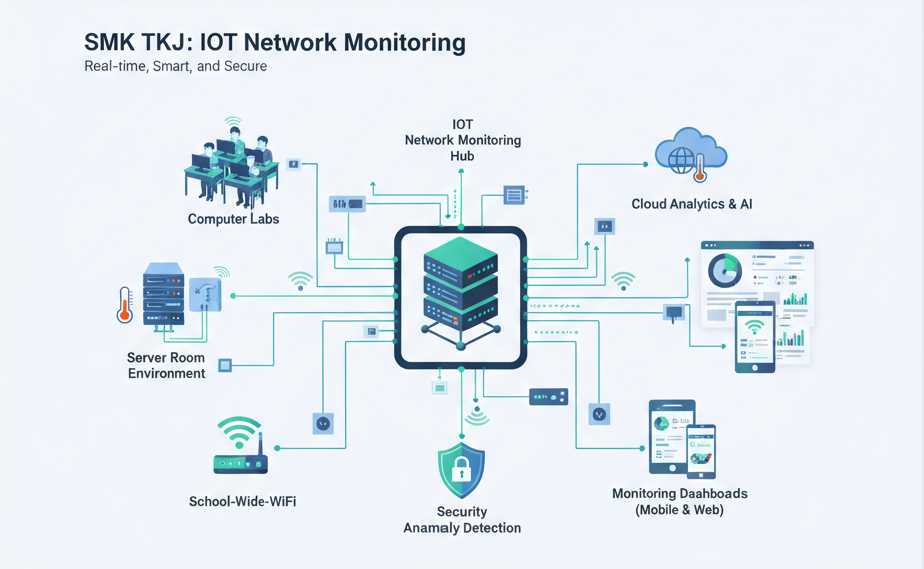
Gambaran Umum
Sistem ini memantau traffic jaringan secara real-time menggunakan Raspberry Pi dan library SNMP. Ketika terjadi anomali seperti lonjakan bandwidth atau serangan DDoS, sistem akan memberikan notifikasi melalui:
- LED RGB (hijau → kuning → merah)
- Buzzer alarm
- Notifikasi Telegram
- Email (opsional)
Cocok untuk pembelajaran mata pelajaran: Jaringan Komputer, Administrasi Server, Pemrograman Python, dan Keamanan Jaringan.
Kebutuhan Perangkat Keras
- Raspberry Pi 4 Model B (2GB RAM atau lebih)
- LED RGB (Common Anode)
- Buzzer aktif 5V
- Kabel jumper, breadboard, resistor 220Ω
- Router/switch yang mendukung SNMP v2c
Kebutuhan Perangkat Lunak
- Raspberry Pi OS (64-bit recommended)
- Python 3.9+
- Pustaka Python:
pysnmp,RPi.GPIO,requests,flask - SNMP diaktifkan di router (community string:
public)
Langkah Instalasi
- Siapkan Raspberry Pi: Install Raspberry Pi OS, aktifkan SSH dan GPIO.
-
Instal dependensi Python:
sudo apt update sudo apt install python3-pip pip3 install pysnmp RPi.GPIO requests flask -
Konfigurasi SNMP di router: Aktifkan SNMP v2c dengan community string
public. -
Sambungkan komponen elektronik:
- LED RGB → GPIO 18 (R), 19 (G), 20 (B)
- Buzzer → GPIO 21
-
Jalankan skrip utama:
python3 network_monitor.py
Kode Program Lengkap (network_monitor.py)
import RPi.GPIO as GPIO
import time
import requests
from pysnmp.hlapi import *

# Konfigurasi GPIO
RED_PIN = 18
GREEN_PIN = 19
BLUE_PIN = 20
BUZZER_PIN = 21

GPIO.setmode(GPIO.BCM)
GPIO.setup([RED_PIN, GREEN_PIN, BLUE_PIN, BUZZER_PIN], GPIO.OUT)
GPIO.output([RED_PIN, GREEN_PIN, BLUE_PIN], GPIO.HIGH)  # Common Anode

# Konfigurasi SNMP
ROUTER_IP = '192.168.1.1'
COMMUNITY = 'public'
OID_IFINOCTETS = '1.3.6.1.2.1.2.2.1.10.1'  # contoh interface index 1

def get_snmp_value(ip, community, oid):
    errorIndication, errorStatus, errorIndex, varBinds = next(
        getCmd(SnmpEngine(),
               CommunityData(community, mpModel=0),
               UdpTransportTarget((ip, 161)),
               ContextData(),
               ObjectType(ObjectIdentity(oid)))
    )
    if errorIndication:
        return None
    else:
        return int(varBinds[0][1])

def set_led(color):
    GPIO.output([RED_PIN, GREEN_PIN, BLUE_PIN], GPIO.HIGH)
    if color == 'green':
        GPIO.output(GREEN_PIN, GPIO.LOW)
    elif color == 'yellow':
        GPIO.output([RED_PIN, GREEN_PIN], GPIO.LOW)
    elif color == 'red':
        GPIO.output(RED_PIN, GPIO.LOW)

def alert_telegram(message):
    BOT_TOKEN = 'ISI_DENGAN_TOKEN_BOT_ANDA'
    CHAT_ID = 'ISI_DENGAN_CHAT_ID_ANDA'
    url = f'https://api.telegram.org/bot{BOT_TOKEN}/sendMessage'
    data = {'chat_id': CHAT_ID, 'text': message}
    try:
        requests.post(url, data=data)
    except:
        pass

def main():
    last_bytes = 0
    while True:
        current_bytes = get_snmp_value(ROUTER_IP, COMMUNITY, OID_IFINOCTETS)
        if current_bytes is None:
            time.sleep(5)
            continue

        if last_bytes == 0:
            last_bytes = current_bytes
            time.sleep(5)
            continue

        delta = current_bytes - last_bytes
        bandwidth_mbps = (delta * 8) / (5 * 1000000)  # 5 detik interval

        if bandwidth_mbps > 80:
            set_led('red')
            GPIO.output(BUZZER_PIN, GPIO.HIGH)
            alert_telegram(f'⚠️ ALERT: Bandwidth mencapai {bandwidth_mbps:.2f} Mbps!')
            time.sleep(1)
            GPIO.output(BUZZER_PIN, GPIO.LOW)
        elif bandwidth_mbps > 50:
            set_led('yellow')
            GPIO.output(BUZZER_PIN, GPIO.LOW)
        else:
            set_led('green')
            GPIO.output(BUZZER_PIN, GPIO.LOW)

        last_bytes = current_bytes
        time.sleep(5)

if __name__ == '__main__':
    try:
        main()
    except KeyboardInterrupt:
        GPIO.cleanup()
Contoh Konfigurasi SNMP di Router MikroTik
/snmp
set enabled=yes
/snmp community
add name=public addresses=192.168.1.0/24
Sesuaikan alamat IP dengan subnet jaringan sekolah Anda.
Pemecahan Masalah
- LED tidak menyala: Periksa koneksi GPIO dan polaritas LED (common anode/cathode).
- Tidak ada data SNMP: Pastikan SNMP diaktifkan di router dan community string benar.
- Notifikasi Telegram gagal: Periksa token bot dan chat ID, serta koneksi internet.
- Skrip error: Jalankan dengan
python3 -u network_monitor.pyuntuk melihat log real-time.